September 2010
S M T W T F S
« Aug    
 1234
567891011
12131415161718
19202122232425
2627282930  

Archives

  • 2010
  • 2009
  • 2008
  • 2007
  • 2006

New Nano

Is it silly to be excited to get a new toy like this? Especially since there have been weeks when I’ve spent more on comic books than I spent on this? (Okay, very few such weeks, but still.)

I mainly plan to use this to play podcasts in my car, replacing my venerable – but nearing the end – 80 Gb “classic” iPod.

The iPad Cometh

I’m not buying an iPad this weekend, though many of my friends and cow-orkers are. I tend to trail the edge of technology adoption anyway; I’m quirky for a programmer that way. For me it seems like the iPad is rife with potential, but there’s not a lot I’d truly use it for from the beginning.

Here are some things I don’t expect to use the iPad for:

  1. Reading books and comic books. To me, most books and many comic books are things to be enjoyed over and over, to be collected and shared through lending and borrowing. I own many books and comics which I expect to enjoy for decades to come, and I have my doubts that the evolution of technology is such that I’ll be able to read an e-book I buy today again in 20 years without going through some sort of annoying upgrading process, due to format changes (never mind DRM issues, if any). Reading literature on a device seems better aimed towards disposable works. To be sure, there are some books which I regard as disposable (this one, for instance), but that’s not the case for most books.

    Of course, many readers may consider most books to be “disposable” in this case. (Debbi gets most of her reading material from the library, the long-time gold standard of disposable literature.) Even the classics are disposable to someone who doesn’t plan to ever read them again. But I’m a collector, so I’m just not the target audience for e-books and e-comics.

  2. Programming. One can program for the iPad, but not on the iPad. More to the point, for me, most of my programming outside work these days involves writing complex Ruby scripts to process baseball statistics and my library of Magic cards. That uses programming as a tool to get some information out the other side, rather than to write an application which is itself the tool; it cuts out the middleman, so to speak. I could imagine rewriting all that stuff so that it runs on the iPad, but it’s not likely that I will. Especially the baseball stuff, which is pretty narrowly tailored to my own quirky needs.

    Programmers are an exception to Frasier Spears’ commentary on the iPad in this way; for us, programming often is a part of the “real work”. But the point is that programmers are not the core audience for the iPad, and I think one reason behind Cory Doctorow’s ire is that he either doesn’t understand or doesn’t accept this.

  3. Writing and blogging. I don’t see myself writing fiction or essays or blog posts on an iPad: Why use the on-screen keyboard or buy an external keyboard when I can just use my Mac? Will it be as easy to do word processing or use WordPress on an iPad as on a laptop, and if not, will that be a significant barrier? I dunno.

    The question of whether the iPad is mainly aimed at content consumers, or whether it will also work well for content producers, is I think an open question. At the moment my impression is that it leans toward the former, but I can imagine the balance evening out over time. Consequently, I can see myself changing my mind about this one more easily than the above two.

On the other hand, here are some things I do hope to use the iPad for, sooner or later:

  1. As a drawing input device. I expect we’ll see apps which allow the iPad to be used as an input device like the Wacom Cintiq in pretty short order, connecting your iPad to a Mac and using it to control Photoshop or other drawing apps which are too resource-intensive to run on the iPad themselves. (Of course, in the long run, why need to even connect it to your Mac? But I doubt we’re there yet for many purposes.)
  2. Playing innovative games. Computer games have been pretty stagnant for the last 10 years, in my opinion. First person shooters, real-time strategy games, simple arcade-style games, they’ve each made incremental advances over time, but nothing that’s blown me away. The last time I played computer games which felt truly new were MYST and Riven back in the 90s. Sure, they were at their core puzzle games, but they were also immersive experiences in exploring a world. I would love to see a thoughtful, immersive game experience enabled by the iPad.
  3. Reading newspapers and magazines. Speaking of disposable literature, I still subscribe to the daily newspaper (the San Jose Mercury News) in print form, and I even save the funnies every day for Debbi to read. I’ll probably keep doing so, but I could see subscribing to other periodicals – especially niche ones, or ones I don’t plan to keep, such as science fiction magazines – and reading them on an iPad. (And yes, I’d certainly pay for them.)

I have no doubt I’ll buy an iPad eventually (perhaps as soon as this summer). This is just my personal and ruthlessly-practical way of looking at it.

The iPad is already a fascinating device from a social-engineering and technological-evolutionary standpoint (if it weren’t, there wouldn’t be all the controversy surrounding it), and the science fiction fan and casual futurist in me would love to write about those aspects. However, the Apple employee in me thinks I should probably stay out of it. (I don’t think anyone really listens to little ol’ me, but there’s no percentage in risking the Internet Hordes unexpectedly descending on my blog and reading more into it than I intend.)

And on that note, off I go to my fantasy baseball draft, which I manage using the aforementioned Ruby scripts on my MacBook Pro.

Neat Mac Software

I don’t often get new software for my Mac, as I find that the software that comes with Mac OS X, or that I’ve bought or downloaded previously does what I want. And with as many hobbies as I have – many of the non-computer hobbies – I’m not generally looking for software to do something new for me. Despite this, I’ve downloaded two new pieces of software in the past week:

  1. ClickToFlash is a very cool Safari plug-in which masks out all the Flash being used on the web from your browsing experience, letting you choose to view a Flash instance on demand, by clicking on the Flash box. Since a lot of annoying animated ads are done in Flash, it also works as a partial ad blocker. It took me just minutes to be really happy I’d downloaded this.
  2. Tweetie is a Twitter client. (There’s also an iPhone version, but I’m happy with Echofon there.) It seems slightly better than Twitteriffic, although I’m hard-pressed to say how; I tried Tweetie because I have friends who love it. I mostly wish that Twitter had a better Web interface so that I didn’t need a separate app for it at all; the service is so simple, you’d think they could make one. Still, since Twitter is of minimal value to me (Facebook is much more useful and fun), it’s not a big deal one way or the other.

What other Mac software out there ought I to be using?

Snow Leopard Celebration

Often when we ship a new version of Mac OS X, there will be a celebration event for the organization. We were trying to remember the other day whether we’ve had one for every release (I’m pretty sure we didn’t have one for Puma), but I’ve thought in any case that none of them equalled the party for shipping Cheetah (OS X 10.0), which was held in Hangar One at Moffett Field.

But I think we just surpassed that one, with the party for Snow Leopard, which was held on Friday evening at the newly-rebuilt California Academy of Sciences. The museum shut down for a private party for just us, and even though there were hundreds people there, I’m told by people who have been to the new building (this was my first visit) that it wasn’t anywhere near as crowded as when it’s open to the public, so it was totally worth it. I don’t even want to think how much it cost to rent the place for a Friday evening.

I visited the old Academy a couple of times before it was demolished (like the De Young Museum nearby, Cal Academy’s old buildings were damaged in the 1989 Loma Prieta earthquake and had to be rebuilt from scratch), and I recall it being interesting but quaint, in an old stone-and-concrete structure which felt too small for the Academy’s ambitions. The new building is huge, three stories tall with a garden that covers the whole roof, and a spacious floor plan based around the Morrison Planetarium in one wing, and the tropical rainforest in the other. It’s quite a structure.

I love rainforests and we made a point of visiting before it closed at 8 pm (the party started at 6:30). You start at the bottom and walk upwards, with the air getting more and more humid as you progress. There are butterflies and birds in the habitat, and you’re asked to check yourself for butterflies before you leave. We also made a point to get Planetarium tickets, where we saw a show titled “Fragile Planet” about the possibility of life on other worlds. The script was a little dodgy at times (although it might play better to someone who hasn’t been reading science fiction all his life), but the visuals were fantastic, especially the opening sequence of lifting off from Earth. Well worth the visit.

The “living roof” was disappointing only in that you can’t see as much in the dark; I suspect it’s better seen in the daytime. Certainly it looked stunning in the Planetarium show. But the interior didn’t disappoint, with African dioramas, the giant pendulum, fossils and skeleton reproductions, displays and interactive presentations, and the Steinhart Aquarium, which is not as impressive as the Monterey Bay Aquarium, but is still fun. The party lasted until 11, which was enough time to see everything, some things more than once.

Debbi came with me as my guest, and were socialized with many of my cow-orkers and their guests. Over the last 10 years I’ve gotten to know quite a few people at Apple, though it’s always a little surprising how many people I don’t recognize, even from just walking around campus. It’s a big company.

Debbi and I left a little early – although things were starting to wind down – and went to Ghirardelli Square to wrap up the evening with ice cream.

I didn’t take pictures of the party itself, but we did take some good pictures of the academy, for your viewing pleasure. I certainly recommend going if you’re in the area – assuming you want to brave the crowds.


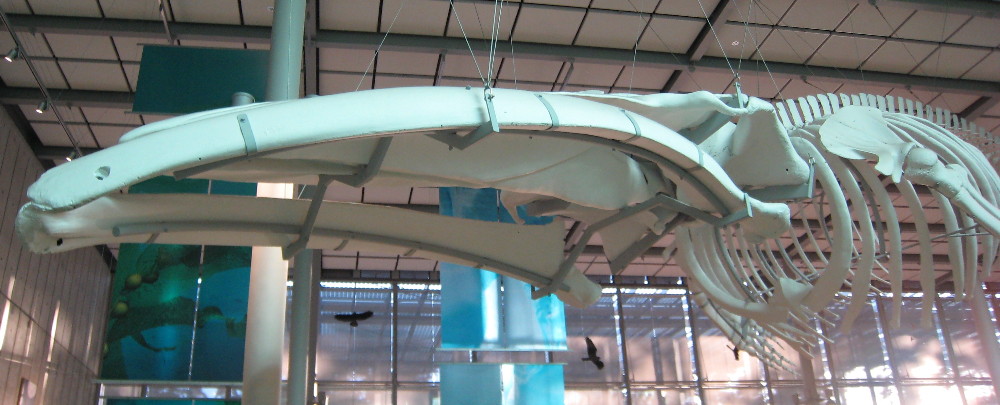
Hanging whale skeleton
The hanging blue whale skeleton
(click for larger image)

Blue Butterfly
Large blue butterfly in the rainforest

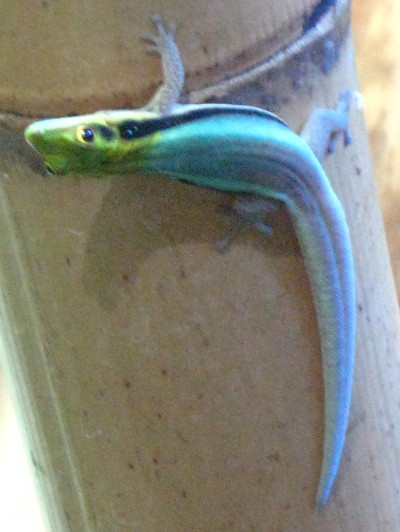
Blue Lizard
This lizard is smaller than my hand

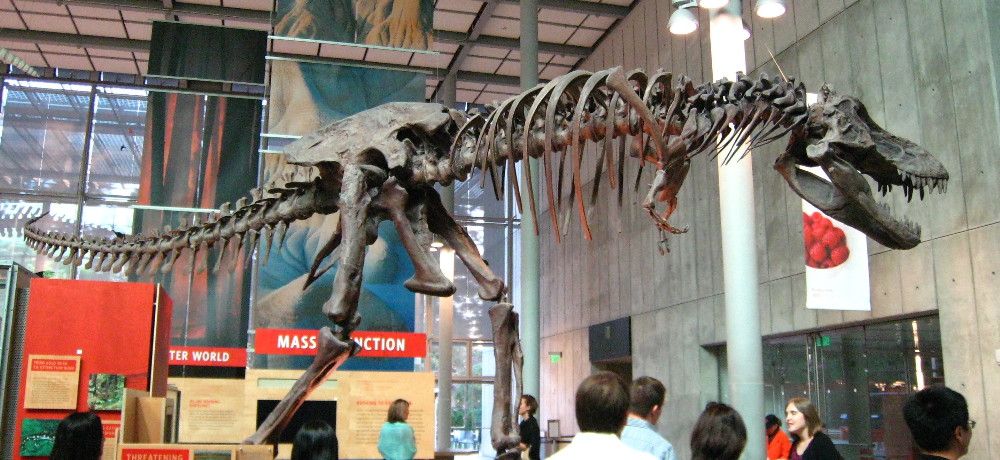
T Rex skeleton
Tyrannosaurus Rex skeleton
(click for larger image)

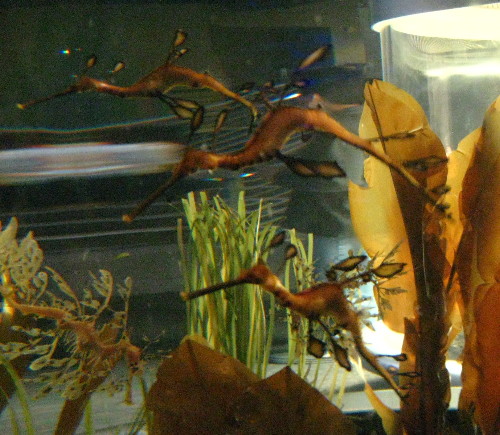
Sea dragons
Sea dragons
(photo by Debbi)

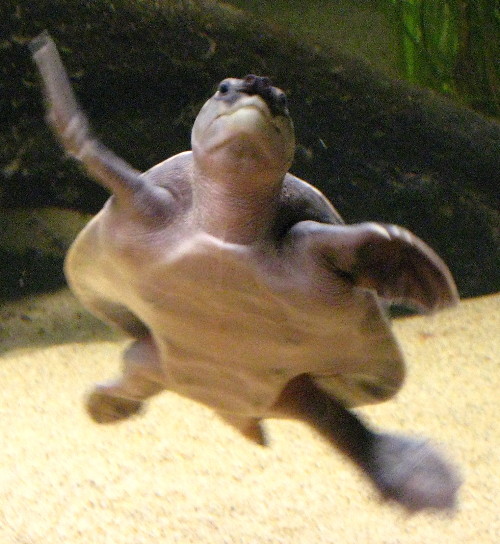
Sea turtle
A lively sea turtle

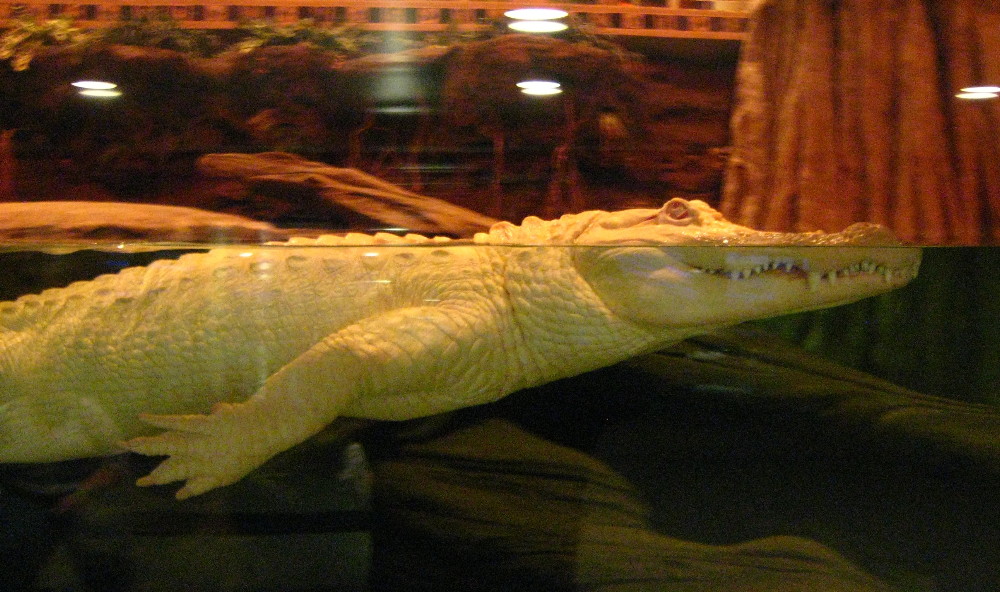
White alligator
A rare albino alligator
(click for larger image)

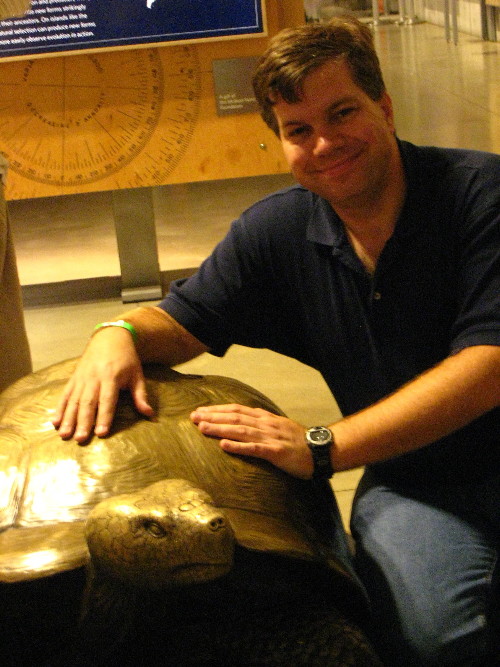
Tortoise and Me
Me and a model of a large tortoise
(photo by Debbi, of course)

Ten Years at Apple

Sunday marked (as the calendar turns) ten years of working at Apple for me. I guess yesterday – Monday – was slightly more relevant, since if course I didn’t start work on a Sunday (although I did go in the previous Friday to get some info from my manager, since I spent my first week in a training class). Yesterday was 522 weeks from that starting date.

But who’s counting?

I’ve spent most of that time working on the Xcode developer tools. Not only is 10 years a long time to work at a single company in Silicon Valley, but nearly-8-years is a long time to be in more-or-less the same role at that company. Of course, every year it seems like I’m working on something new and different, using new technology, so there’s a lot of variety within my job. There’s so much going on here that even if I switched teams every couple of years there’s still more neat stuff to work with and work on than anyone could fit into a lifetime. (Contrast with my previous company, where after 4 years I felt like I’d basically done everything there was to do, on a technical level.)

(Of course, I “celebrated” my anniversary by spending the whole day investigating a heisenbug, but that’s the way it goes sometimes!)

Although the job has its frustrations, there’s no substitute for working with smart people on a project that matters, even if it’s not the most visible or glamorous project around. And I know my work is appreciated, which helps a lot too.

It’s been an exciting decade for Apple, too; the company was just starting its upswing when I joined the company, about a year after the first iMac was introduced. It’s been fun to have been there through all of that.

When I told one of my closest friends at my old company that I was going to interview with Apple, she said, “Oh, you are so out of here.” Ten years later, I’m glad I got the offer, and I’m glad to have taken the job. And I’m glad to have stuck around this long. I hope to stick around a good while longer.

WWDC 2008

I put in my time at WWDC this week. In addition to staffing the Xcode lab, I also was demo boy for a presentation – the first time I’ve been on stage at a conference other than Q&A sessions.

It all went pretty well, with one exception: Mid-afternoon yesterday, shortly before the presentation, I started getting a headache. In the somewhat overheated presentation room, the headache got worse. I was okay when I was actually driving the demo, but waiting between demos I was feeling really cruddy. Afterwards I went to the lab for my shift, but at that point the headache had gotten really awful and my stomach felt upset. I finally left early and caught the train back home, where Debbi picked me up at the station. At home I went straight to bed and slept for 12 hours nearly-straight.

I’m not sure if I was dehydrated (we’re having another heat wave here), or had a touch or food poisoning, or just had a migraine. But I felt much better this morning, if a little wobbly. Possibly from skipping dinner.

There are a lot of people for whom WWDC is a big social event, and they spend the whole week up there, even renting a hotel room in the city. I’m not one of those people, so I’m back in the office today. In a way I envy those folks, since I’m sure it’s a lot of fun for them, seeing old friends etc. I rarely have that experience, even at SF conventions, and I know a lot more people in fandom than I do in the Mac developer community. Ah well. Diff’rent strokes and all that.

The Scanner Blues

A few months ago I took the plunge and upgraded our desktop computer at home to Leopard. After all, I’d been running it both at work and on both of our laptops, and it seemed fine. Okay, I’d had to update some freeware and shareware, but that’s to be expected. I should probably update them more than once every 3 years anyway. :)

Well, it went smoothly, except for one problem: I can’t get my scanner to work under Leopard. Which is a bummer, since I use the scanner to scan book and comic covers for this journal, album art for my iTunes library, and also to scan items I put up for sale on eBay.

I have a Canon CanoScan LiDE 80, which was reasonably inexpensive and (more importantly) small and flat, but with a decent-sized platen for scanning. It’s worked well for several years, on both Panther and Tiger. But on Leopard it doesn’t work at all.

My first problem is that I use the version of Adobe Photoshop Elements that came with the scanner, which means that it’s now quite old, and won’t even launch on Leopard. If this were the worst problem, it would be surmountable; I could try to figure out Image Capture, which comes with Mac OS X, or I could try to use GraphicConverter or buy a copy of VueScan. Or heck, I could just buy the newest version of Photoshop Elements.

The larger problem is that the LiDE 80 doesn’t seem to be supported on Leopard, and in fact Canon seems to do a poor job of updating their drivers – the most recent drivers for this scanner were posted on 10/4/2007, which was shortly before Leopard was released. So I infer that they haven’t really been updated to work with Leopard. And n matter what I try, I haven’t been able to get them to work, even using the TWAIN driver, as other applications don’t seem to recognize Canon’s TWAIN driver. (The drivers also appear to be available only for PowerPC machines, which is fine for my desktop machine, since it is such a machine, but I’d like to buy an Intel-based Mac sometime soon, and that will pretty much hose it.) Someone recommended I check out SANE to see if they have a driver for it, but they don’t; apparently the scanner uses a “backend” which SANE doesn’t yet support. Alas.

It appears that other people have had the same problem, but I haven’t found a concrete solution. This thread has a lot of discussion about the issue, and some people seem to have gotten it to work, but others have not. I’m one of the “have not” people. On the other hand, one person was able to get it to work with VueScan, which I haven’t tried. (Although since VueScan seems to have a free trial, perhaps I should.)

So anyway, my solution to all this was to realize yesterday: Hey, I bought a second internal hard drive for the desktop machine a while back! So I partitioned that drive and installed Tiger on one partition, brought it up to date, and then installed the Canon software along with Photoshop Elements. Sure enough, the scanner works great in that environment. So at least that gives me a solution for the short term.

The longer term will involve buying a new computer, and then probably a new scanner. It seems that Epson has been releasing new drivers for Leopard, so I might give them a try, perhaps the V200 Photo. I’m certainly more inclined to buy a scanner from someone who appears to be actively supporting the platform.

If anyone has any advice or suggestions on what to get, I’d appreciate it.

Of course, I’ve needed to buy a new stereo receiver for months, and haven’t gotten around to that, so who knows when I’ll get to doing all this? (Then again, I installed Tiger on a new partition on a whim last night, so it could happen at any time…)

Two Great Tastes That Go Great Together

Sign heralding the upcoming new Apple Store in Boston evokes the look of Fenway Park’s Green Monster. Neat!

(via Daring Fireball, even if Gruber is a sourpuss when it comes to Boston sports.)

iPhone Experience

Impressions after a few days with my iPhone:

First of all, realize that I think the most practical piece of computer hardware to come along in the last ten years are Palm PDAs, and the only thing they have over the Apple Newton is that they’re faster, and they fit easily into my pocket. I use them to store my calendar, my address list, and (most importantly) my extensive want list of comics, books, CDs, and other items I collect. And I can back up the data onto my computer (which is critical in all three cases).

By contrast, I have fairly little use for a mobile phone: I’ve had a low-end phone for a while, but I mainly use it to coordinate with Debbi, and in case of emergencies. I don’t use it for work, and I sometimes forget to take it with me, and rarely miss it. So it’s handy, but far from essential. I use my land line far more than I use my cell phone.

So I suspect I’m an unusual customer for an iPhone. On the other hand, since I was gifted with one I was certainly interested enough to activate it (and even paid an early-cancellation fee on my existing phone to do so!).

The hardware is nice: The form factor is fine for a handheld computer, a little taller and narrower than my PDA, and a lot thinner. As a phone it feels funky, a solid rectangular object, but I’m used to a clamshell enclosure that curves around my cheek and where the mike is closer to my mouth. I’ll probably get used to that difference.

The glass screen is surprisingly durable, I’d expected I’d scratch it within the first few days of use, but it’s still pristine. I tend to carry my stuff in my pockets rather than in a belt holster, so I bought a MarWare Sidewinder for it. It comes with a belt clip and a wrap for the earphones, as well as a clear film for the screen, which seems to work well. (Note to self and others: When applying plastic film to iPhone, do so in a cat-hair-free zone.)

Voice quality seems fine, although I think my old Verizon service was somewhat clearer. My impression is that voice quality will vary widely depending on where you are and, well, your personal preference. People seem very opinionated when it comes to wireless services.

Making calls is really slick and easy: Just find someone in your address book and hit their number. Or dial a number. And it brings up a palette of several options while a call is in progress, so you don’t have to remember what button to hit to put a call on speakerphone.

The user interface is responsive enough that I almost never feel like I’m waiting for the phone to do anything, although sometimes I do wait for it to get data from the network.

The “mechanical” aspects of the UI work well for me: My fingers aren’t small (though they’re not huge), and I find the general buttons and the pop-up keyboard to both be pretty easy to use. I’m getting better with the keyboard: Mainly I had to train myself to hold the phone level, rather than at a slight tilt to the side, and that made keypunching much more accurate. That’s a much easier hill to climb than, say, learning Graffiti. I rarely have to hit anything twice because I “missed” the first time, but I do sometimes. Not enough to annoy me. On the other hand, I have a hard time seeing myself doing extensive typing (e.g., journal entries of any length) from the phone.

Scrolling is simple, and the zoom gesture is really cool.

Network connectivity: WiFi connectivity is easy to set up (although if you have a 14-character password for your home network, like I do, then typing it in while you’re still getting used to the keyboard is a bit tricky; it took me three tries), and the phone is good at locating a network when it’s in a new location. EDGE connections feel (to me) to be about half as fast as WiFi, which is fast enough to look up maps, but a bit slow for surfing the web.

Google Maps is the killer app on the iPhone. It’s got the street maps, satellite view, traffic info (depending on your location), easy scrolling and zooming, directions, and bookmarks. It’s the first feature of the phone I used which made me glad to have the phone: When we went minigolfing on Saturday and found our destination was closed, I looked up the location of a nearby minigolf course which I’d seen, and found directions for it. It’s easy to envision finding other destinations in the same way (one of the iPhone ads already does so).

The Safari web browser is pretty handy, although I suspect it has some subtleties I have yet to figure out. I had some early problems with it crashing on me several times, but it’s stopped. I did reboot the phone when it happened, so maybe that cleared up whatever the glitch was.

Mail is a nice convenience, although it’s not something I really need. Since it doesn’t have mailbox filters, you’ll need server-side filters in order to make good use of it. Unfortunately, my Dreamhost e-mail (i.e., the address for this site) requires a security certificate to access, and I can’t find a way to set up such a thing on the iPhone. That’s a bummer.

The biggest weakness of the iPhone, for me, is that you can’t synchronize the Notes to your computer. As I said above, I keep extensive notes on my PDA, mainly for my collecting hobbies (but for other things too), so this is the biggest obstacle to my simply replacing my PDA with the iPhone. Because I simply can’t afford to lose this data. I could perhaps create a Web page with the info and access that with the phone, but then I couldn’t really add to it while I’m out shopping. Hopefully this will be one of the first issues to be addressed.

(To be fair, I haven’t dived very deep to see if there are ways to work around these issues. Maybe there are. I’m not real interested in “hacking” my phone, however.)

Syncing addresses and music is exactly as trivial as you’d expect it would be. Mail accounts, calendars and Safari bookmarks all gets synced, too.

I haven’t used the camera, photo albums, voice mail or text messaging much yet. I haven’t used the calendar at all (until I can replace my PDA with the phone I may keep using it for my calendar). I also haven’t really used it as an iPod yet, although Cover Flow is a pretty nifty way to scan through all your music on the thing.

Overall I’m pretty happy with the phone: It’s useful as a phone, it’s very useful as a map program, and its has a lot of other features come in handy from time-to-time. While I really wish it could sync Notes, it’s still very polished for a first-generation piece of hardware.

Oh, and the first software update for the phone is available.

Evolution of Apple’s Products

Evolution of Apple’s products over the last 30 years, showing how the company’s industrial design sense has changed and evolved.

(via Stephen Leigh)